
Menus and Social Icons
Pegasus menus are built under Appearance → Menus, the standard WordPress menu screen (see also Menus). What makes Pegasus different is its display locations.
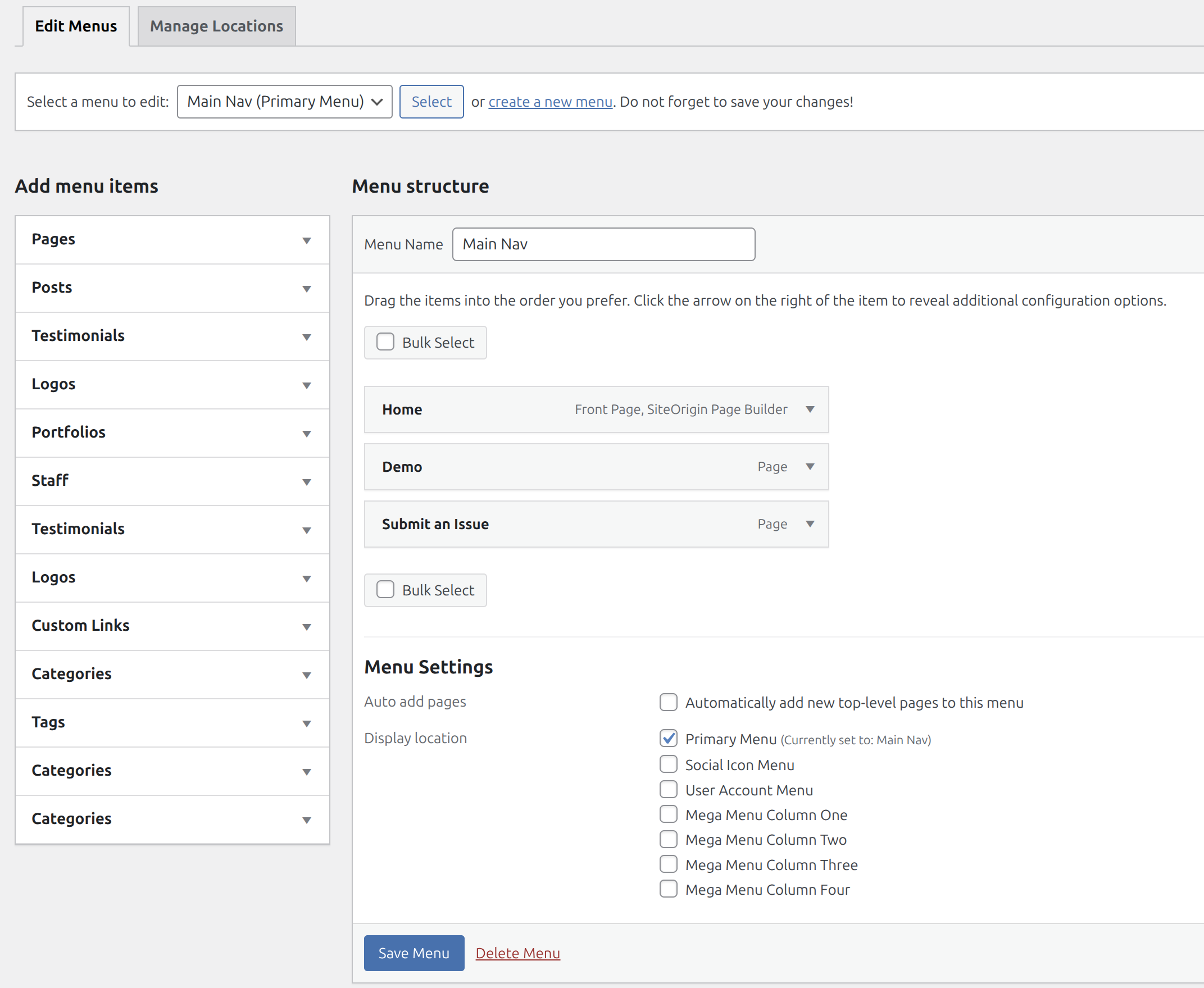
Display locations
Section titled “Display locations”Under Menu Settings at the bottom of the menu screen, check where the menu should appear:
| Location | Used for |
|---|---|
| Primary Menu | Your main navigation. Every header layout reads from this location, so make sure it’s checked. |
| Social Icon Menu | Social links in the header/footer |
| User Account Menu | The user (account) menu, e.g. on WooCommerce sites |
| Mega Menu Column One – Four | The columns of Header One’s MegaMenu |
The number of Mega Menu Column locations follows the More Menu Widget Areas setting in Header Options. If Mega Menu: Navs or Widgets is set to Widgets, the columns become widget areas (Mega Menu 1, Mega Menu 2, …) under Appearance → Widgets instead.
There’s also Auto add pages, which automatically adds new top-level pages to the menu. Leave it unchecked if you’d rather control the menu yourself.
Always click Save Menu when you’re done.
Social media icons
Section titled “Social media icons”Pegasus uses Font Awesome 4 icons for social links. They can appear in the primary navigation, the top bar, or the Footer Social widget area.
Option 1: As a menu (primary nav / top bar)
Section titled “Option 1: As a menu (primary nav / top bar)”- Appearance → Menus → create a new menu.
- Add a Custom Link and paste the social profile URL.
- Open Screen Options (top-right) and check CSS Classes and Link Target.
- Expand the link, check Open link in a new tab, and set CSS Classes to the icon class, e.g.
fa fa-facebook. - Repeat for each platform, assign the menu to its location, and Save Menu.
Icon classes (one per link):
fa fa-facebookfa fa-linkedinfa fa-youtubefa fa-twitterfa fa-instagramfa fa-githubfa fa-mediumfa fa-pinterestfa fa-tiktokOption 2: Footer Social widget (Custom HTML)
Section titled “Option 2: Footer Social widget (Custom HTML)”- Appearance → Widgets → open the Footer Social Widget area (it shows in the footer, right before the copyright).
- Add a Custom HTML widget/block and paste markup like this, swapping in your own links. Platforms without an icon can just use text (like “Ebay” below):
<ul class="sage-social"> <li><a target="_blank" href="https://www.youtube.com/@YourChannel"><i class="fa fa-youtube"></i></a></li> <li><a target="_blank" href="https://www.instagram.com/yourhandle/"><i class="fa fa-instagram"></i></a></li> <li><a target="_blank" href="https://www.ebay.com/str/yourstore">Ebay</a></li> <li><a target="_blank" href="https://medium.com/@yourhandle"><i class="fa fa-medium"></i></a></li></ul>- Save, then check your footer.